Get your first in-person payment running quickly.
Prerequisites
- A SumUp merchant account
- A supported reader or Tap to Pay-capable device
- The credentials required for your chosen integration:
- Affiliate Key for Reader SDKs and Payment Switch
- Authorization for Cloud API and Tap to Pay SDK flows
Sandbox Merchant Account
To test without real money, create a sandbox merchant account from the SumUp Dashboard.
- Log in to your SumUp account.
- Open Developer Settings(Opens in a new tab).
- In the Sandbox environment section, create a sandbox merchant account if you do not have one yet.
- Open the account switcher in the Dashboard and select Sandbox Merchant Account.
If you don’t have a sandbox account yet, sign up for a developer account(Opens in a new tab). This starts you with a sandbox merchant account.
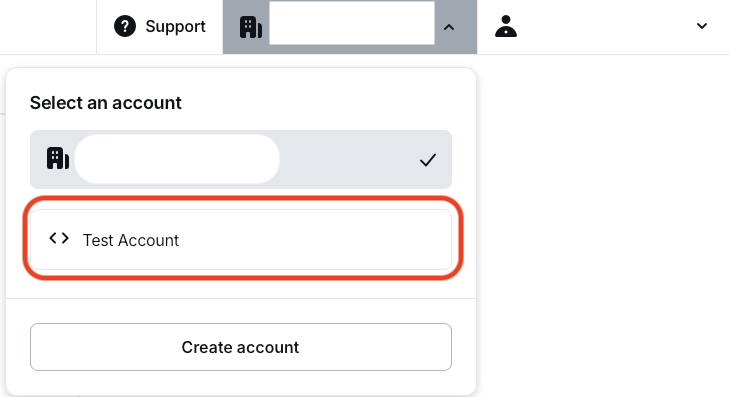
Sandbox accounts do not process real funds. They have a separate merchant ID, show a clear warning in the Dashboard, and requests with a value of 11 always fail by design so you can test failed transaction scenarios.

Choose Your Path
Reader SDKs
Best for native Android and iOS apps that want more control over the payment experience.
- Install the SDK for Android SDK, iOS SDK, or Android Tap-to-Pay SDK.
- Authenticate the merchant.
- Pair a reader over Bluetooth, or initialize Tap to Pay on device.
- Start a payment and handle the result in your app.
Cloud API
Best for server-driven, web-based, or multi-platform systems using Solo readers.
- Set up authorization for API access.
- Pair or register a Solo reader through the Cloud API.
- Create a checkout for the paired reader.
- Let the reader complete the payment and track the result asynchronously.
Payment Switch
Best for lightweight legacy mobile integrations that hand off checkout to the SumUp app.
- Install the SumUp app on the merchant device.
- Build a Payment Switch request with amount, currency, and a callback URL.
- Open the SumUp app and let it handle the checkout.
- Receive the payment result back in your app.
Use a unique transaction reference such as foreignTransactionId or foreign-tx-id for each payment. That prevents duplicate transaction conflicts and makes reconciliation easier.
Next Steps
- Need an embedded mobile flow? Continue with Reader SDKs.
- Need remote Solo payments? Continue with Cloud API.
- Need app handoff to SumUp? Continue with Payment Switch.